
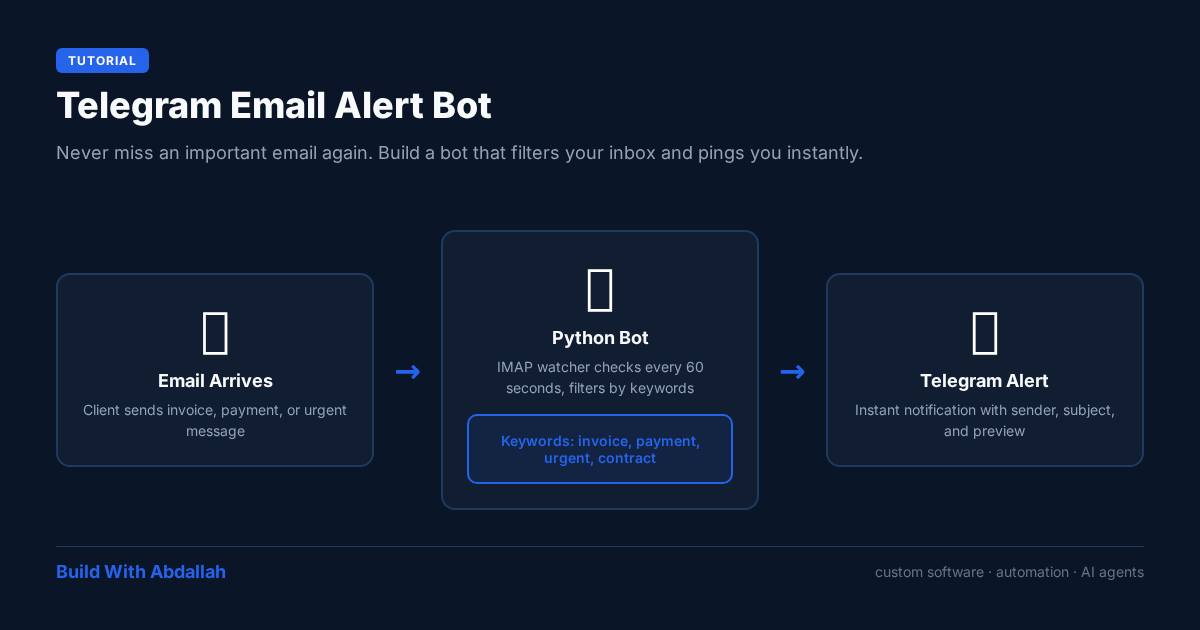
What You Will Build
A lightweight Python script that:
- Connects to your email via IMAP
- Watches for unread messages matching keywords or sender rules
- Sends a Telegram notification with sender, subject, and preview
- Runs continuously on a server, Raspberry Pi, or even your laptop
Prerequisites
- Python 3.9+
- A Telegram bot token (create one via @BotFather)
- Your Telegram chat ID
- Email account with IMAP access (Gmail, Outlook, etc.)
- python-telegram-bot and python-dotenv
Setup Steps
Step 1: Create Your Telegram Bot
- Message @BotFather on Telegram
- Send /newbot and follow prompts
- Save the bot token
- Message your bot once, then visit: https://api.telegram.org/bot<TOKEN>/getUpdates
- Look for "chat":{"id":123456789 — that is your chat ID
Step 2: Enable IMAP on Your Email
Gmail
Settings → See all settings → Forwarding and POP/IMAP → Enable IMAP
Outlook
Settings → Mail → Sync email → Enable IMAP
For Gmail, you will need an App Password, not your regular password, if 2FA is enabled.
Step 3: Create the .env File
Create a .env file in the same directory as your script:
EMAIL_USER=your-email@gmail.com
EMAIL_PASS=your-app-password
BOT_TOKEN=your-telegram-bot-token
CHAT_ID=123456789
IMAP_SERVER=imap.gmail.com
Never commit this file to git. Add .env to your .gitignore.
Step 4: Install Dependencies
pip install python-telegram-bot python-dotenv
Step 5: The Script
Create email_alert_bot.py:
import imaplib
import email
import asyncio
import os
from dotenv import load_dotenv
from telegram import Bot
from datetime import datetime

# Load environment variables
load_dotenv()

# Configuration from .env
IMAP_SERVER = os.getenv("IMAP_SERVER", "imap.gmail.com")
EMAIL_USER = os.getenv("EMAIL_USER")
EMAIL_PASS = os.getenv("EMAIL_PASS")
BOT_TOKEN = os.getenv("BOT_TOKEN")
CHAT_ID = int(os.getenv("CHAT_ID", "0"))

# Validate configuration
if not all([EMAIL_USER, EMAIL_PASS, BOT_TOKEN, CHAT_ID]):
    raise ValueError("Missing required environment variables. Check your .env file.")

# Keywords that trigger alerts
ALERT_KEYWORDS = ["invoice", "payment", "urgent", "contract", "client"]
ALERT_SENDERS = ["client@example.com", "boss@company.com"]

bot = Bot(token=BOT_TOKEN)


def escape_markdown(text):
    """Escape Telegram Markdown special characters."""
    chars = ["_", "*", "[", "]", "(", ")", "~", "`", ">", "#", "+", "-", "=", "|", "{", "}", ".", "!"]
    for char in chars:
        text = text.replace(char, f"\\{char}")
    return text


async def send_alert(sender, subject, preview):
    # Escape Markdown characters to prevent formatting issues
    safe_sender = escape_markdown(sender)
    safe_subject = escape_markdown(subject)
    safe_preview = escape_markdown(preview[:200])

    message = (
        f"*New Important Email*\n\n"
        f"*From:* {safe_sender}\n"
        f"*Subject:* {safe_subject}\n"
        f"*Preview:* {safe_preview}..."
    )

    await bot.send_message(
        chat_id=CHAT_ID,
        text=message,
        parse_mode="MarkdownV2"
    )


async def check_emails():
    try:
        mail = imaplib.IMAP4_SSL(IMAP_SERVER)
        mail.login(EMAIL_USER, EMAIL_PASS)
        mail.select("inbox")

        _, messages = mail.search(None, "UNSEEN")
        for msg_num in messages[0].split():
            _, msg_data = mail.fetch(msg_num, "(RFC822)")
            raw_email = msg_data[0][1]
            email_message = email.message_from_bytes(raw_email)

            sender = email_message["From"] or "Unknown"
            subject = email_message["Subject"] or "(No subject)"

            # Extract body with better charset handling
            body = ""
            if email_message.is_multipart():
                for part in email_message.walk():
                    content_type = part.get_content_type()
                    if content_type == "text/plain":
                        try:
                            payload = part.get_payload(decode=True)
                            if payload:
                                charset = part.get_content_charset() or "utf-8"
                                body = payload.decode(charset, errors="ignore")
                                break
                        except Exception:
                            continue
            else:
                try:
                    payload = email_message.get_payload(decode=True)
                    if payload:
                        charset = email_message.get_content_charset() or "utf-8"
                        body = payload.decode(charset, errors="ignore")
                except Exception:
                    body = "(Could not decode email body)"

            should_alert = False

            # Check sender
            if any(s.lower() in sender.lower() for s in ALERT_SENDERS):
                should_alert = True

            # Check keywords in subject or body
            content = f"{subject} {body}".lower()
            if any(kw.lower() in content for kw in ALERT_KEYWORDS):
                should_alert = True

            if should_alert:
                await send_alert(sender, subject, body)
                print(f"Alert sent: {subject}")

        mail.close()
        mail.logout()

    except Exception as e:
        print(f"Error checking emails: {e}")


async def main():
    print(f"Bot started at {datetime.now()}")
    print(f"Monitoring: {EMAIL_USER}")
    print(f"Keywords: {', '.join(ALERT_KEYWORDS)}")
    print("Press Ctrl+C to stop\n")

    while True:
        await check_emails()
        await asyncio.sleep(60)  # Check every minute


if __name__ == "__main__":
    try:
        asyncio.run(main())
    except KeyboardInterrupt:
        print("\nBot stopped by user")
Step 6: Run and Test
python email_alert_bot.py
Send yourself an email with "urgent" in the subject. You should get a Telegram message within a minute.
Step 7: Run It 24/7
Since this script uses while True, it runs forever until stopped. Here are your options:
Option A: systemd (Recommended for production)
# Create a systemd service file
sudo nano /etc/systemd/system/email-bot.service

# Paste this content:
[Unit]
Description=Email Alert Bot
After=network.target

[Service]
Type=simple
User=pi
WorkingDirectory=/home/pi
ExecStart=/usr/bin/python3 /home/pi/email_alert_bot.py
Restart=always
RestartSec=10

[Install]
WantedBy=multi-user.target

# Then enable and start:
sudo systemctl enable email-bot
sudo systemctl start email-bot
sudo systemctl status email-bot
Option B: screen or tmux (Quick and simple)
# Using screen
screen -S emailbot
python email_alert_bot.py
# Press Ctrl+A then D to detach

# To reattach later
screen -r emailbot

# Using tmux
tmux new -s emailbot
python email_alert_bot.py
# Press Ctrl+B then D to detach

# To reattach later
tmux attach -t emailbot
Option C: cron (Only for single-run scripts)
Do NOT use cron with this script as-is. The while True loop means the script never exits. Running it via cron would start a new bot every 2 minutes, creating duplicates.
If you want to use cron, rewrite the script to run once and exit (remove the while True loop and just call check_emails() once).
Common Mistakes
- Hardcoding credentials in the script — Always use a .env file and load variables with python-dotenv
- Using your regular Gmail password with 2FA enabled — Use an App Password instead
- Checking too frequently — Every 60 seconds is fine; every 5 seconds will get you rate-limited
- No error handling — IMAP connections drop; wrap everything in try/except
- Alert fatigue — Start with 3-5 keywords, not 50, or you will ignore the bot
- Using cron with a never-ending script — Use systemd or screen/tmux instead
Business Use Case
A small business owner gets 50+ emails daily but only 5 matter. Instead of checking email constantly (or missing critical messages), the bot filters and alerts in real time. The owner sees urgent notifications on Telegram instantly and batches the rest for later.
Agencies can set this up for clients too — alert on emails from specific domains, project codes, or payment-related keywords.
Extensions
- Add Gmail API instead of IMAP for better reliability
- Use webhooks instead of polling for instant delivery
- Connect to a database to track alerted emails and avoid duplicates
- Add a "Mark as read" or "Reply" button in Telegram
- Multi-user support — different chat IDs for different team members
Build With Abdallah — custom software, automation, and AI agents.